1
Start with One Clear Subject
Every good thumbnail has a single focal point. Decide whether it is a face, an object, or text, and build everything else around that one thing.
Testimonials
I always thought my thumbnails were fine until I compared them to the top videos in my niche. The difference was embarrassing. Fixed the contrast and text size based on these principles and saw an immediate jump in clicks.
Omar Hassan
Science educator, 156K subs
The rule about keeping text to 3 words changed everything for me. I used to write full sentences on my thumbnails. Cutting it down to just the hook phrase doubled my CTR on tutorial videos.
Lisa Chen
DIY crafts channel, 83K subs
Understanding color contrast was the single biggest improvement I made. My old thumbnails used pastel colors that looked nice on my monitor but completely disappeared on phone screens.
Ryan Porter
Music production, 47K subs
Started testing two thumbnail versions for each video. Within a month I had real data showing that emotional faces outperform object-only thumbnails by 35% for my audience.
Fatima Al-Rashid
Book review channel, 62K subs
Examples
Real how to make a good youtube thumbnail examples from creators

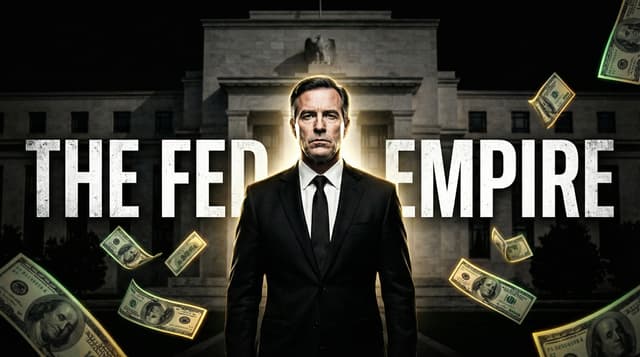








How It Works
Every good thumbnail has a single focal point. Decide whether it is a face, an object, or text, and build everything else around that one thing.
Pick bright, saturated colors that contrast against both YouTube's white and dark mode backgrounds. Your thumbnail competes with dozens of others on screen.
Write 2-4 words in the thickest font you can find. Add a dark outline or drop shadow. If the text is not readable at the size of a postage stamp, make it bigger.
Shrink your thumbnail to the size it actually appears on a phone. If anything feels cramped, cluttered, or unreadable, simplify until it passes this test.
Who It's For
Creators who make thumbnails but feel like they are missing something
YouTubers whose videos are good but CTR stays stubbornly below 4%
Anyone who wants to understand the design thinking behind high-performing thumbnails
Channels ready to level up from basic thumbnails to ones that actually compete
Try These
“Person with exaggerated surprised expression holding up a product, clean gradient background transitioning from blue to purple, bright white text with black outline”
“Top-down view of a beautiful meal being plated, warm restaurant lighting, appetizing food photography style with minimal text overlay”
“Person pointing at a whiteboard with a simple diagram, educational but engaging, warm studio lighting, approachable teacher vibe”
Benefits
Copying a popular thumbnail style without understanding the principles behind it leads to inconsistent results. One video performs well, the next flops, and you have no idea why. When you understand contrast, focal hierarchy, and emotional triggers, you can apply those principles to any video topic. You stop guessing and start designing with intention.
You probably have videos on your channel right now with decent content and terrible thumbnails dragging them down. Understanding what makes a good thumbnail lets you audit your back catalog and fix the worst offenders. Updating the thumbnail on an old video is the fastest way to get more views without creating new content. YouTube re-evaluates the video when you change the thumbnail.
Different audiences respond to different visual cues. Gaming viewers expect bright neon and action. Cooking audiences prefer warm tones and appetizing compositions. Finance viewers respond to clean layouts with big numbers. Once you understand the baseline principles, you can adapt them to your specific niche instead of applying generic advice that may not fit your audience.
The most time-consuming part of making thumbnails is not the actual creation. It is the indecision. Should the text be red or yellow? Should the face be bigger? Should you add more elements? Design principles give you a framework for making these decisions quickly and confidently. Constraints are liberating because they eliminate the paralysis of unlimited options.
Thumbnail Studioo gives you the tools to apply these principles without being a designer. Our AI thumbnail generator creates thumbnails that already follow proven click-through patterns, and the thumbnail editor lets you fine-tune every element. Sign in and see the difference good design makes.
Describe your next video and see AI-generated thumbnails that follow proven design principles. Adjust text, colors, and composition until it passes the squint test.
Create a Good YouTube ThumbnailFree 3-day trial • Cancel anytime
FAQ
A good thumbnail communicates one idea instantly. You should be able to glance at it for half a second and understand what the video is about and why you should click. Okay thumbnails require study. Good thumbnails hit you immediately. The difference usually comes down to three things: a clear focal point, readable text, and high color contrast.
YouTube shows the thumbnail first and larger than the title on most surfaces. On mobile, where 70% of views happen, the thumbnail takes up most of the visual space. Many successful creators design the thumbnail first and write the title to complement it, not the other way around. Think of the thumbnail as the billboard and the title as the fine print below it.
Not necessarily. Some niches like travel, cooking, or photography perform better with image-only thumbnails because the visuals speak for themselves. But for most content types, 2-4 words of bold text significantly improves CTR. The text should add context that the image alone does not communicate. If the image already tells the full story, skip the text.
Check your click-through rate in YouTube Studio analytics. The average across YouTube is around 4-5%. If you are consistently below that, your thumbnails need work. If you are above 7%, you are doing well. Compare thumbnails across your own videos to see which styles perform best for your specific audience.
A good thumbnail will get more people to click, but if the video does not deliver on the thumbnail's promise, viewers leave quickly. YouTube tracks this as low audience retention and will stop recommending the video. The ideal combination is an honest thumbnail that accurately represents genuinely good content. Clickbait works once. Quality works forever.
Trying to communicate too many ideas at once. Creators cram faces, text, objects, logos, and borders into a single thumbnail because they want to convey everything about the video. The result is visual noise that viewers scroll past. The best thumbnails pick one concept and execute it clearly. One face. One phrase. One background. That is usually enough.
More Use Cases