1
Describe the Moment
Name the reaction, the contrast, or the reveal your video actually has. Specific beats vague every time.
Examples



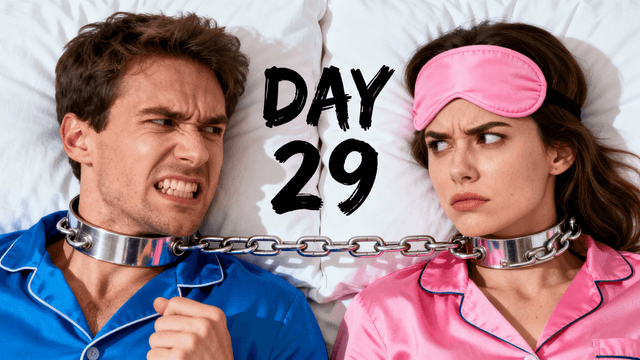




Strip the negative connotation and it is four repeatable techniques, not deception:
| Technique | What It Looks Like | Why It Works |
|---|---|---|
| Shock expression | Wide eyes, open mouth, exaggerated reaction frozen mid-moment | Faces are processed faster than text or objects; an extreme one stops the scroll |
| High contrast | One bright color against a dark or neutral background | The subject separates instantly from every other thumbnail in the feed |
| Curiosity gap | Partial reveal, an arrow, a censored or blurred detail | Creates a question the viewer can only answer by clicking |
| Bold minimal text | 2 to 4 words, thick font, heavy outline | Adds context the title alone does not give, readable at 200px wide |
The four techniques above show up differently depending on what the video actually is:
Reveal and reaction videos
Money and finance content
Countdown and ranking videos
Mystery and investigation content
The techniques on this page are neutral, a shocked face and a bright color do not lie to anyone. The line gets crossed when the thumbnail promises something the video does not deliver: a fake screenshot, a number that never gets mentioned, an expression for an event that did not happen.
The test is simple: if someone finishes the video, does the thumbnail still feel accurate? A "clickbait" thumbnail that holds up after the watch is just good design. One that does not is what tanks retention, and retention is what YouTube's algorithm actually rewards. Use every technique on this page. Just make sure the video pays off what the thumbnail sets up.
How It Works
Name the reaction, the contrast, or the reveal your video actually has. Specific beats vague every time.
AI creates high-contrast compositions with expressive subjects and room for text, built from your prompt.
Two to four words, heavy outline, in the thumbnail editor. Name the stakes, not the answer.
Download at 1280x720, YouTube-ready. No watermarks.
Who It's For
Creators who know the techniques work but do not want to hire a designer for every upload
Channels A/B testing bold, high-contrast concepts against calmer designs
Anyone whose thumbnails currently look flat next to competitors using shock and contrast
Creators who want the click without misrepresenting what the video actually is
Try These
“Extreme close-up of a person mid-gasp, hand halfway to their open mouth, eyes wide, dramatic single-color spotlight from the side, dark background, room on the left for bold text”
“Split-frame comparison: a stuffed wallet on the left in warm gold light, an empty wallet on the right in cold blue light, dividing line down the center, dramatic contrast”
“Person looking off to the side at a glowing object just out of frame, half their face lit by the glow, mysterious and curious expression, dark moody background, cinematic”
“Giant bold number centered in frame with a person pointing at it with an exaggerated shocked expression, bright single-color background, high contrast composition”
Benefits
Shock expressions, high contrast, curiosity gaps, generated from a prompt instead of trial and error in a design tool.
Generate a few bold variations in minutes and pick the one that actually stops the scroll.
Bold design and an accurate thumbnail are not opposites. Build one that gets the click and still holds up after the watch.
Describe the moment, get the composition. Add text in the editor. No layers, no masks.
Every high-performing thumbnail uses the same handful of techniques: an expressive face, a color that pops against YouTube's white and dark UI, text that creates a question instead of answering it. Creators search "clickbait thumbnail generator" because they want that formula without guessing at it themselves or hiring a designer for every upload.
Thumbnail Studioo's AI thumbnail generator builds bold, high-contrast thumbnails from a text prompt: expressive subjects, dramatic lighting, room for text. Refine it in the thumbnail editor with glow and outline text effects. Sign in to generate your first one.
Describe the moment, get a high-contrast concept, add text that creates a question. Export at 1280x720. Try free for 3 days.
Generate a Clickbait ThumbnailFree 3-day trial • Cancel anytime
FAQ
No. YouTube prohibits thumbnails that are deliberately misleading, not thumbnails that are bold or dramatic. Shock expressions, high contrast, and curiosity gaps are standard design techniques used across nearly every high-performing channel.
Four things: an expressive face, high contrast against the background, a curiosity gap that does not give away the answer, and bold minimal text. Combine them and the thumbnail earns the click without needing to lie.
Same underlying generator, tuned toward what actually drives clicks: expressive subjects, dramatic lighting, high contrast, and room for punchy text, rather than a neutral or flat composition.
Yes. Bold design and an accurate thumbnail are not opposites, the failure mode is promising something specific that never happens on screen. Match the thumbnail to a real moment in the video and retention is unaffected.
Thumbnail Studioo exports at exactly 1280x720, 16:9, YouTube's required spec, with no manual resizing needed.
Yes. Start a 3-day free trial with full access to AI generation and the editor, no watermarks.