1
Pick the Tension Point
Every episode has one moment worth teasing: the confrontation, the discovery, the loss. Build the thumbnail around that single beat, not a summary of the episode.
Examples


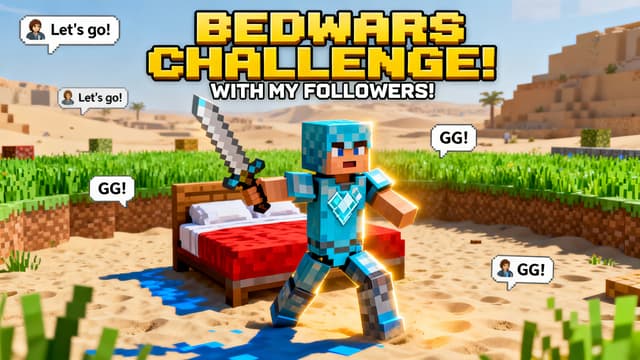


Four layouts cover almost every SMP episode:
The standoff. Two characters on opposite sides, contrasting colors, tension in the empty space between them. The default for any conflict episode and the highest-clicking SMP format.
The witness. One character in the foreground looking shocked while the event happens behind them: the burning base, the empty vault, the army on the horizon. Puts the viewer inside the character's reaction.
The alliance shot. Multiple characters standing together, facing the camera, unified colors. Works for team-ups, faction formation episodes, and finales.
The aftermath. No characters at all, just the consequence: the destroyed base, the claimed territory, the abandoned flag. Rare enough that it stands out, and it creates the strongest curiosity gap of the four.
The thumbnail's job is to make not clicking feel like missing out. The most common SMP thumbnail mistake is showing the resolution: the winner standing over the loser, the base already destroyed, the traitor revealed. Once the outcome is visible, the reason to click is gone.
Tease the setup instead. Two armies facing each other outperforms the battle's winner celebrating. A character discovering the empty vault outperforms the thief holding the loot. Questions click better than answers.
The exception is milestone episodes. "WE WON THE WAR" as a finale thumbnail works because the payoff itself is the draw after weeks of buildup. Save outcome thumbnails for moments that earned them.
How It Works
Every episode has one moment worth teasing: the confrontation, the discovery, the loss. Build the thumbnail around that single beat, not a summary of the episode.
Describe the location and mood. War episodes get dark skies and fire. Alliance episodes get sunrise light. The scene sets the emotional tone before anyone reads a word.
Add posed skin renders of the players involved. Keep each character on their consistent side and in their faction colors so returning viewers instantly know who is in this episode.
Same font, same outline, same placement every episode. Change only the words. Export at 1280x720 and the next chapter is live.
Who It's For
SMP members who upload multiple episodes a week and need thumbnails fast
Server owners keeping a consistent visual identity across every member’s uploads
Lifesteal and war-arc channels where every episode teases a conflict
Creators documenting long-running series who need episode 50 to look like it belongs with episode 1
Try These
“Two Minecraft characters facing off on opposite sides of the frame, one in blue armor and one in red armor, cracked ground between them, stormy sky, tense standoff mood”
“Minecraft character looking shocked while a massive base burns in the background at night, orange fire glow, smoke, betrayal energy, space at the top for text”
“Group of five Minecraft characters standing together on a hill at sunrise, victorious after a war, banners waving, warm golden light, epic wide shot”
Benefits
When episode thumbnails share a visual system, viewers who liked one episode recognize the rest instantly on your channel page. That recognition is what turns a single click into a six-episode session.
SMP viewers follow people, not gameplay. Keeping each player’s skin, colors, and side of the frame consistent means the thumbnail communicates the matchup before the title loads.
Blue versus red. Green versus orange. Once your series establishes team colors, a split-color thumbnail communicates the entire conflict in half a second, which is exactly how long you have.
SMP events happen live and the recap needs to ship while the drama is fresh. Scene generation plus a saved text style means an episode thumbnail takes minutes, not an evening in Photoshop.
SMP content is serialized storytelling and the thumbnail is the episode poster. The hard parts are specific: recognizable characters across dozens of episodes, faction identity at a glance, and speed, because when the server war happens tonight, the thumbnail ships tomorrow morning.
Generate the scene with the AI thumbnail generator: a war-torn base, a tense standoff location, a celebration. Layer in your posed skin renders, keep your series text style consistent in the thumbnail editor, and export at 1280x720. Version history keeps your past episode thumbnails in one place so the style stays consistent. Sign in to start.
Scenes, characters, and series-consistent text in minutes. Built for SMP schedules where the drama happens tonight and the upload is tomorrow.
Make Your Episode ThumbnailFree 3-day trial • Cancel anytime
FAQ
Same as every YouTube thumbnail: 1280x720 pixels, 16:9, under 2MB. Thumbnail Studioo exports at exactly that size. If your SMP also posts shorts or clips elsewhere, make the 1280x720 version first and crop from it.
Lock three things and never change them: your text font and placement, your faction color coding, and where recurring characters stand. Generate new scenes freely for each episode. The fixed elements carry the series identity while the scene keeps each episode fresh. Version history in the editor keeps past thumbnails visible so drift does not creep in.
You can generate scenes with the same high-stakes energy those servers are known for: dramatic lighting, hearts and damage effects, PvP standoffs. Describe the mood in your prompt. What you should not do is copy another creator’s actual thumbnail art, which can earn a copyright complaint. Matching the genre energy is fine; cloning a specific artist is not.
Get transparent PNG renders of each player’s skin (Nova Skin handles this in a couple of minutes per skin), then layer them onto a generated scene in the editor. Keep it to two or three characters. Beyond that, faces shrink below recognizability at phone size and the thumbnail turns into a crowd scene.
For weekly episodic content, yes, small and consistent, usually a corner badge. It helps binge viewers track where they are. For event arcs like wars and finales, drop the number and let the moment carry the thumbnail. The episode number matters less than the drama on those uploads.