1
Describe the Scene
Name the biome, the lighting, and the mood. Mention where you need empty space if a character or text is going on top.
Examples


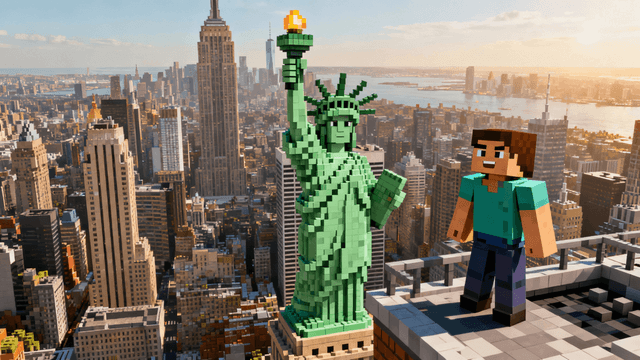


Match the background to the story the episode tells:
| Content Type | Background That Works | Lighting |
|---|---|---|
| Survival and hardcore | Caves, night forests, mob-filled darkness | Low light with one strong source: lava glow, torchlight, moonlight |
| Base and build tours | The build itself wide-angle, or a clean plains backdrop | Golden hour sunset, warm and bright |
| SMP episodes | Recognizable server locations, war-torn or celebratory versions | Match the arc: red tones for conflict, warm for peace |
| Speedruns and challenges | Nether and End scenes, portal rooms | High contrast, saturated purples and reds |
| Horror and mystery | Fog, abandoned structures, glitched terrain | Desaturated with one unnatural color accent |
Legally, most of what you find in an image search belongs to someone. Fan art belongs to the artist. Screenshots from other channels belong to those channels. Official game art belongs to Mojang, whose guidelines allow some uses but not all. Most creators never get caught, but channels have taken copyright strikes over thumbnail art, and a strike over a background is a bad trade.
Practically, the popular results are overused. The same handful of cave renders and sunset panoramas appear behind thousands of thumbnails. Viewers might not consciously recognize a recycled background, but sameness is exactly what makes a feed scroll past.
Generating puts you on the right side of both problems. The image is unique, and there is no artist somewhere discovering their work on your channel.
How It Works
Name the biome, the lighting, and the mood. Mention where you need empty space if a character or text is going on top.
Run the prompt 3-4 times. Each generation is different and one is usually clearly stronger than the rest.
Add your posed skin render, your face, or just bold text. The background should support the subject, not compete with it.
Download at exactly the size YouTube wants, under the 2MB limit, ready to upload.
Who It's For
Creators whose gameplay screenshots are too dark or cluttered to work as thumbnails
Channels that layer a posed skin over a scene and need the scene to be clean
SMP members who want a consistent background style across every episode
Anyone who wants backgrounds that are not already on a hundred other channels
Try These
“Massive Minecraft cave with glowing diamond ore veins in the walls, lava pool at the bottom, dramatic god rays from a hole in the ceiling, empty space on the left for a character”
“Minecraft plains biome at golden hour with a huge oak forest in the distance, warm orange sky, soft clouds, clean open composition with space for bold text at the top”
“Dark Minecraft nether landscape with crimson forest, glowing portal in the background, embers floating in the air, ominous red fog, high contrast”
Benefits
Downloaded backgrounds are shared by every channel that found the same search result. Generated backgrounds exist once. In a feed where every Minecraft thumbnail looks related, being visually distinct is an advantage you can manufacture.
Pre-made backgrounds force you to work around whatever is in them. When you generate, you decide where the empty space goes, which side the light comes from, and where your character or text will sit.
Backgrounds pulled from image searches often belong to artists who never agreed to the use. Generated scenes skip the problem entirely, along with the watermarks and the 720p upscaling artifacts.
A hardcore near-death episode needs a different sky than a cozy base tour. Describing the mood in the prompt gets you a background that matches the video instead of the closest thing you could find.
The hunt starts when a screenshot lets you down: too dark, too cluttered, wrong angle. Downloaded backgrounds bring their own problems, the good ones are already on hundreds of channels and the rest are watermarked or legally murky. A generated background is unique, correctly sized, and yours.
Describe the scene to the AI thumbnail generator: the biome, the lighting, the mood, and whether you need empty space for a character or text. It generates a Minecraft-style background in seconds. Then layer your skin render or text on top in the thumbnail editor and export at 1280x720. Sign in to generate your first one.
Describe the biome, the light, and the mood. Get a custom Minecraft scene in seconds and build your thumbnail on top of it.
Generate a BackgroundFree 3-day trial • Cancel anytime
FAQ
Make it 1280x720 pixels, the exact YouTube thumbnail size, so nothing gets cropped or stretched. Generating at final size beats downloading a wallpaper and cropping it, which usually cuts off the most interesting part of the image.
Say it in the prompt. Add "empty space on the left side" or "clean open sky at the top for text" to the description. The AI composes around the request, which saves you from generating a beautiful scene with no room for the subject.
Backgrounds you generate during your trial or subscription are yours to use on your channel, with no watermarks and no attribution needed. That is the practical difference from image-search results, where usage rights are usually unclear at best.
The AI generates in the style of Minecraft but does not know your specific world. For a background that shows your actual base, take a screenshot in-game and enhance it in the editor: brighten it, punch up the colors, and blur or simplify distracting areas. For everything else, describing the type of scene is usually enough.
Simplicity and contrast. At 200 pixels wide, busy scenes turn to noise. The backgrounds that hold up have one clear focal area, strong color contrast, and no fine detail doing important work. If the background still reads when you shrink it to the size of your thumb, it will work in the feed.