1
Describe the Stake
Write the amount, the object, or the challenge premise. Specific numbers and objects work better than vague descriptions.
Examples
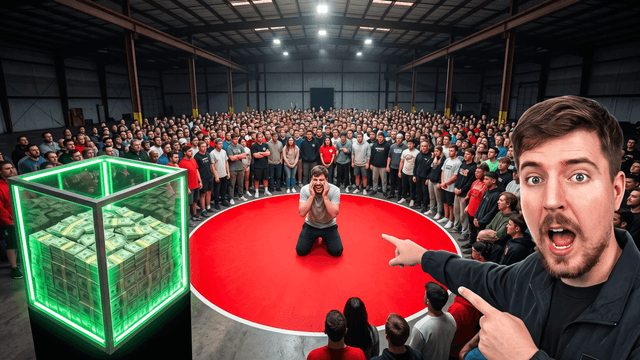
The elements that make this thumbnail style work:
| Element | What It Does | Example AI Prompt |
|---|---|---|
| The stake | Makes the premise concrete and huge | Giant glowing dollar sign made of cash, dramatic studio lighting, oversized scale next to a small person |
| The expression | Sells shock before the title is read | Person with mouth wide open in disbelief, eyes wide, dramatic spotlight, arms thrown up |
| The stunt visual | Shows the physical scale of the challenge | Person standing next to an enormous pile of gold bars, warehouse setting, dramatic side lighting |
| The color pop | Keeps the thumbnail readable at small sizes | Bright saturated colors, high contrast, single bold accent color against a dark or neutral background |
This format works because it front-loads the entire premise in one image: an amount, an object, or a stake so large it demands an explanation. Specificity matters, a vague amount of cash means nothing, but a concrete number or object is instantly clear. Genuine reaction matters too; an exaggerated smile reads as fake, while real shock or excitement reads as authentic even when staged. Restraint on clutter matters most: one big stake plus one expression is the format. Every additional element dilutes the two things doing the actual work.
How It Works
Write the amount, the object, or the challenge premise. Specific numbers and objects work better than vague descriptions.
AI builds a big, dramatic background matching that stake in about 30 seconds.
Add bold, high-contrast text and a single accent color so the thumbnail reads instantly at small sizes.
Download at 1280x720, no watermarks, ready before your video finishes uploading.
Who It's For
Challenge and stunt channels that need a new high-stakes thumbnail for every upload
Creators building "I did X for Y dollars" or "last to leave wins" format videos
Comparison-style channels (cheapest vs most expensive) needing bold split compositions
Anyone scaling a high-budget-feeling channel without a studio or design team
Try These
“Person standing next to a huge pile of gold bars in a warehouse, bright side light, shocked face, gold bars much bigger than the person, 16:9 YouTube thumbnail”
“Split photo, cheap broken item on the left side, fancy expensive version on the right side, bold line down the middle, bright light, 16:9 YouTube thumbnail”
“Person with arms up celebrating, money and confetti falling around them, bright colorful background, big happy face, 16:9 YouTube thumbnail”
“Giant glowing number made of bright light, small person standing underneath it, spotlight shining down, dark background, 16:9 YouTube thumbnail”
“Person with mouth wide open in shock, standing in front of a huge expensive item, bright light, bold colors, 16:9 YouTube thumbnail”
Benefits
Generate the pile of cash, the luxury item, or the outrageous stunt scene from a text description instead of sourcing or building props.
Describe the exact reaction you need and get it in seconds, no camera setup or multiple takes to catch the right expression.
Split-screen layouts for cheap-vs-expensive and before-vs-after challenge formats, a staple of this thumbnail style.
Reuse the same color palette, text style, and composition formula so your channel builds a recognizable look.
Challenge and stunt channels lean on the same visual formula that made this style of thumbnail a genre of its own: oversized numbers, extreme expressions, and a stake that's instantly clear. Stock photography can't show a custom prize or a specific stunt, and hiring a designer for every upload is slow. Creators search for a faster way to build that big-budget, high-stakes look.
Describe your challenge, the prize, the stunt, the stakes, and the AI thumbnail generator builds a background matching that big-budget energy. Add oversized bold text with the thumbnail editor, keep contrast high, and export at 1280x720. Start your 3-day free trial.
Describe the challenge, the stake, the reaction. AI builds the background in seconds. Bold text, 1280x720 export. Try free for 3 days.
Start Making Challenge ThumbnailsFree 3-day trial • Cancel anytime
FAQ
1280x720 pixels, YouTube's standard 16:9 ratio. Thumbnail Studioo exports at exactly this size automatically.
Yes. Describe the object, amount, or setting, a pile of cash, a luxury car, a warehouse of prizes, and the AI builds a background matching that scale and lighting.
A concrete, specific stake, a genuine (even if exaggerated) reaction, and minimal clutter around those two elements. Vague premises and busy compositions both underperform.
Yes. Upload a photo of yourself and build the rest of the thumbnail around it in the editor, or generate the reaction with AI instead.
Yes. Start a 3-day free trial with full access to AI generation, the editor, and HD export. No watermarks. Cancel anytime.